
High Altitude Ballooning has a lot to offer – Engineering, Crafting, Electronics, Meteorology… For many, the thrill of the chase draws us. There is a certain ‘tornado hunting’ aspect to staying ahead of the payload and venturing out into the countryside. Will we luck out and have it land beside the road? Or will the tallest tree in the area suck in the payload? Will it be just poison ivy, or will I be hospitalized with Rocky Mountain Spotted Fever… again? Over my 50 some odd chases, I’ve developed of kit of gear that I take along on the adventure. Here is what I usually suggest to school teams that are going on a chase:
HAB CHASE TEAM
Duties: Post-launch (T+15) the team and drivers will have a brief safety meeting to discuss chase procedures. They will share their contact information (phone numbers) with Mission Control and other chase vehicles. A typical flight lasts 2.5 hours, so depending upon the flight path, they have some flexibility on when they need to hit the road. The goal is to be within 10 miles or so of the projected landing area (with all passengers fed and run by a bathroom) at time of balloon burst (~T+100).
Mission Control may lose telemetry as the altitude drops below 1000 feet. So during decent, a member of the chase crew will need to activate/operate an APRS radio receiver. At landing, this will help give the GPS coordinates to within 50 feet.
Once landed, Chase Team adults will then need to evaluate the safety in contacting landowners and proceeding to recover the payload. Make note of the landowners name/address so that the team can send a thank-you note. Upon recovery, the team would return to base (usually after a required ice cream stop).
No driving while operating the smartphone.
You must ALWAYS obtain permission before going on someone’s land. Having bright eyed, excited students along helps when you go knocking on doors.
Resources:
-Vehicles able to travel an hour in any direction (full tanks of gas).
-Each vehicle should have at least one Internet capable smartphone onboard to be operated by students – not the drivers.
-Car charger and/or extended battery for smartphone is a must as the batteries will drain quickly.
-Smartphone(s) should be preloaded with the free “HabHub Chase Car Tracker” app. It is also suggested to load a free Geocaching app such “Commander Compass Lite”.
-Smartphone should have “http://tracker.habhub.org” and “http://aprs.fi” bookmarked with the flight callsign.
-Each member should dress for a possible hike – long pants, play clothes/shoes. Very bright colors are preferred. It would not hurt to have a change of clothes.
-Bottles of water and perhaps snacks.
-Camera to document the adventure.
-Bug spray and sunscreen. Raincoats if needed.
-Some form of signage on vehicles can be fun. This can be tempera paint writing on the car, or just simple paper signage put in the window, ex. “School Chase Car #1”.
-Blaze orange vests or similar brightly colored safety vests.
-APRS radio receiver.
Nice to have:
-Tree pruning pole or similar extending pole.
-A paper road map or one of those cool DeLorme Gazetteers (this is helpful if phone service is spotty).
-A set of waders.
-Walkie-talkies.
-Duct tape and rope.
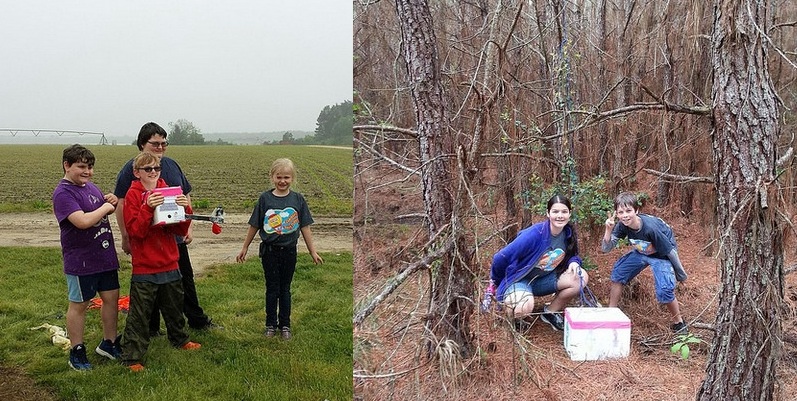
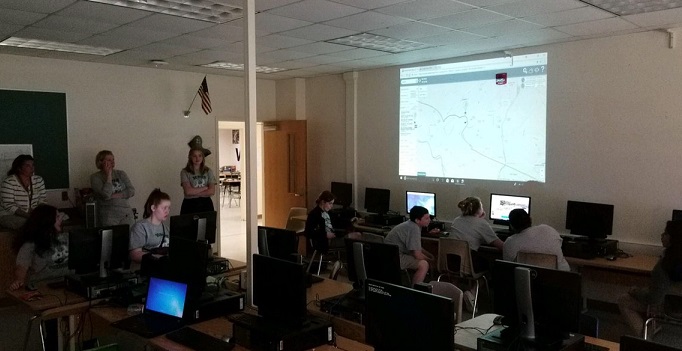
APRS for the chase
Being able to surf to an APRS tracking site while chasing is important. When I started out, I relied upon APRS.FI or FINDU.COM for the chase. I also built an Excel document that would import live data from a FINDU CGI and plot ascent/descent rates (Did I fill the balloon right? Did the parachute open?). Since then, the awesome HAB folks over in the UK have added tons of features to HABHUB.ORG which has become my go-to site. Not only can I immediately see the ascent rate and telemetry data, but the site also predicts a landing zone based upon weather data. And you can track chase cars too. Very cool!
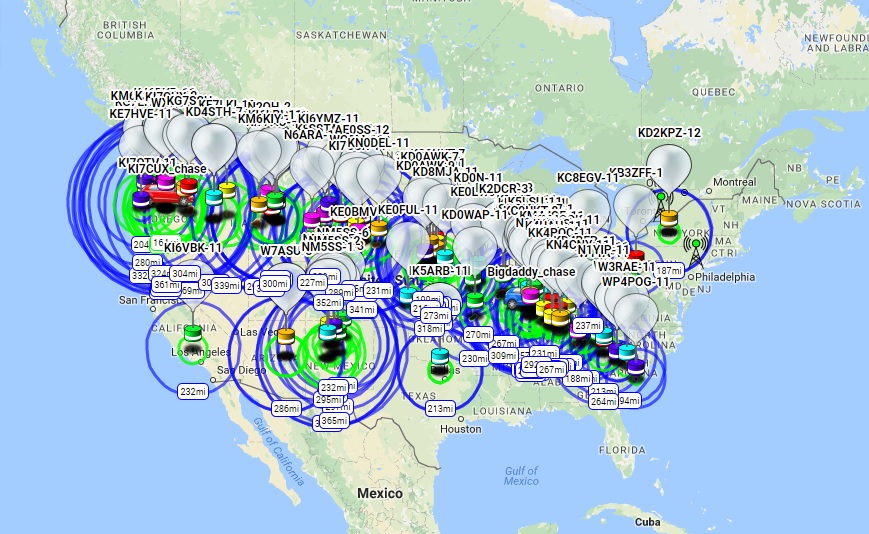
Just keep in mind that these sites can only help you while the APRS data is being received by an iGate and presented out to the Internet. On most flights, once the payload drops down below 1000 feet, the low power APRS packets have difficulty making it to a repeater/iGate. This especially happens if the payload lands in a valley or in a position that tips the antenna horizontally. A pine forest can also attenuate radio signals. So that leaves the chase crew with about a square mile in which to hunt to find the small payload. I’ve noted in the past that this can be a blessing of sorts if you happen to have a publicized flight. Having the exact landing spot hidden from the general public might help prevent someone from stealing your gear. But that also means that the chase crew will need some sort of radio gear with them to receive the final landing coordinates. Here are a few options:
HAM radio with built-in APRS: Many handie-talkie and car-based radios now come with some sort of ARPS reception ability. Most I have seen are in excess of US$300.
HAM radio wired to a computer that can decode APRS: You can wire a HAM radio into a Terminal Node Controller box (modem) and then into a computer, but this can be a bit bulky for car use. To slim this down some, you could wire the headphone jack of a HAM radio into the microphone jack of a laptop. Then set up a program, like AGW Packet Engine, that will listen to the audio stream and try to decode it. You could also use a software defined radio (SDR) USB device that plugs directly into a laptop. [Link for SDR APRS]
One inexpensive solution that I have used for the past few years is a HAM radio wired into a smartphone.
I picked up a cheap Baofeng handie-talkie radio for US$25. I figured it could do double-duty as an emergency radio as it can pick up broadcast FM, weather, and other channels. Using a few discrete components and old earbuds, I then built a cable to connect the BaoFeng to an old unused iPhone that was destined for recycling.
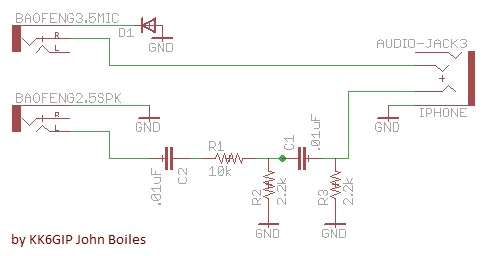
There is also a vendor online selling this pre-made “K2 to TRRS” cable for US$20.
To operate: Tune the radio your APRS frequency (North America = 144.390MHz) and crank up the volume. On the iPhone load the PocketPacket app or Android try APRSdroid (both US$5). You might be able just hold the radio’s speaker up to the phone’s mic so that it can overhear the APRS packet squawks, but I found that the radio-to-phone cable worked more reliably. My old phone no longer had cell service, but it could also take photos and was loaded with a Geocaching app (Compass Commander Lite) and be used when on the hunt in the woods.
If you are interested in also being able to send APRS packets from your rig, you will need to wire up the part of the circuit from iPhone back to the radio. Then you must enable VOX on the Baofeng. At that point PocketPacket can then generate outgoing packet noises and the radio will transmit them. Be careful with this, as any noises that the phone makes will go out via radio.
AP510 with Android: Lately I have made up a compact little chase car command center using an old Android tablet and a spare AP510 tracker. I programmed up the AP510 to NOT automatically send out position packets, but instead speak the KISS protocol, via Bluetooth, to the tablet. On the tablet, I installed APRSdroid (US$5) app. This lets me transmit and receive APRS while the actual AP510 radio is mounted somewhere else in/outside the car. If I then add Internet to the Android, say via WiFi-tethering it to my smartphone, I can also have APRS.FI, HABHUB, and Google Maps running.
There are plenty of other combinations that you can dream up for a command center. Be sure to check out the coolest :Dave A link.
My next step will be finding an easy way to Copy-n-Paste the received APRS coordinates directly into an offline Geocaching app. Today I pull the chase car over near the landing area and quickly jot down the received coordinates on paper. I then feed them into Compass Commander Lite making sure to adjust for degrees/minutes into decimal degrees or whatever. In some areas in eastern NC there is limited cell coverage, so all of this must be done without Internet access.
-Paul Lowell, KD4BFP